
Did you know that the average person blinks 66% less often while staring at a digital display? This simple biological shift is the primary reason so many of us suffer from dry, tired eyes by the end of the workday. Prioritizing your ocular health is no longer optional in our modern, hyper-connected world.
Adopting a quick 3-step screen break routine allows you to combat digital fatigue effectively. By integrating these small habits into your day, you can protect your long-term vision and boost your daily comfort. Embracing digital wellness ensures that your eyes remain sharp and refreshed, even during the busiest hours.
You do not need hours of downtime to see a difference. Spending just a few minutes away from your devices provides the relief your body craves. Start today to experience the lasting benefits of a healthier relationship with your technology.
Key Takeaways
- Reduced blinking rates during device usage lead to significant eye strain.
- A simple, consistent habit helps mitigate the negative effects of prolonged monitor time.
- Prioritizing eye health improves overall daily productivity and comfort.
- Digital wellness practices require only a few minutes of your time each day.
- Consistent vision care is essential for maintaining long-term ocular health.
Understanding the Impact of Digital Eye Strain
If you find yourself rubbing your eyes by mid-afternoon, you are likely experiencing the effects of prolonged screen exposure. In our modern digital landscape, screen time management is no longer just a productivity tip; it is a vital health necessity. When we stare at monitors, tablets, or phones for hours, our eyes struggle to maintain focus, leading to a condition known as Computer Vision Syndrome.
Common Symptoms of Computer Vision Syndrome
Computer Vision Syndrome, or digital eye strain, encompasses a range of ocular and physical discomforts. Most people notice that their eyes feel dry, gritty, or irritated after a long session of work. You might also experience blurred vision or difficulty refocusing when you look away from your device.
Beyond the eyes themselves, this syndrome often triggers secondary physical issues. Many users report persistent headaches, neck pain, and shoulder tension caused by poor posture while squinting at screens. Recognizing these signs early is the best way to reduce eye strain before it becomes a chronic issue.
| Symptom | Primary Cause | Impact Level |
|---|---|---|
| Dry Eyes | Reduced blink rate | Moderate |
| Blurred Vision | Ocular muscle fatigue | High |
| Headaches | Constant focus effort | High |
| Neck Tension | Poor viewing posture | Moderate |
Why Your Eyes Need Regular Intervals of Rest
Your eyes are not designed to focus on a single point for eight hours straight. When you engage in consistent screen time management, you allow your ocular muscles to relax and reset. Taking short, frequent breaks is the most effective strategy to naturally reduce eye strain throughout your busy day.
Without these intervals, your eyes remain in a state of constant tension. By stepping away from the screen, you give your eyelids a chance to distribute moisture across the surface of the eye. This simple habit prevents the cumulative fatigue that often ruins your focus by the end of the workday.
The Science Behind the Quick 3-Step Screen Break Routine
The secret to maintaining healthy vision lies in understanding how your ocular muscles respond to constant focus. When you stare at a digital display for hours, your eyes remain locked in a fixed position. This static state creates unnecessary tension that leads to fatigue and discomfort.
By incorporating screen break exercises into your daily routine, you allow your eyes to reset naturally. These small adjustments help improve focus and reduce the physical burden placed on your visual system.
How Focus Shifts Affect Ocular Muscles
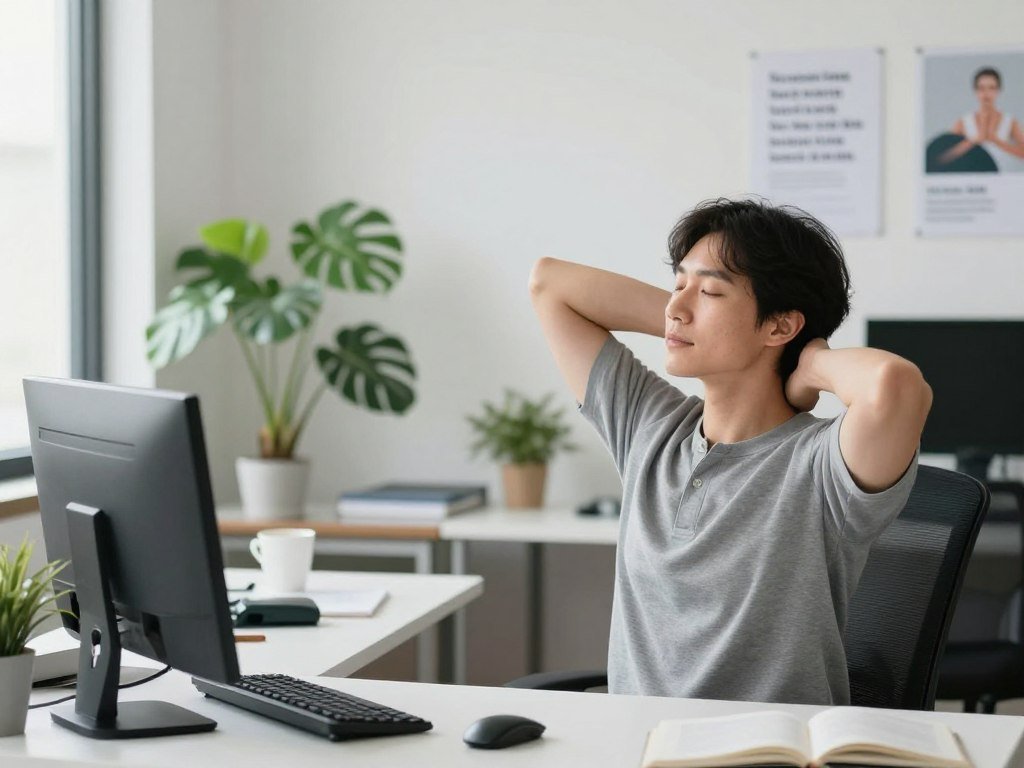
Your eyes rely on the ciliary muscles to adjust the shape of the lens, allowing you to see objects at varying distances. When you work on a computer, these muscles stay contracted for long periods to maintain near-field clarity. This constant effort is exactly why you need a regular break from screens to prevent strain.
Shifting your gaze between near and far objects acts like a stretch for your eyes. It forces the ciliary muscles to relax and contract, which promotes better blood flow and reduces stiffness. This simple movement is a powerful way to improve focus and keep your vision sharp.
The Role of Blinking in Maintaining Surface Moisture
Blinking is a vital reflex that keeps your eyes hydrated and clear. Under normal conditions, you blink frequently to spread a protective tear film across the surface of your eye. However, when you concentrate on a screen, your blink rate often drops significantly.
This reduction in blinking causes the tear film to evaporate, leading to dryness and irritation. Taking a conscious break from screens allows you to restore this natural moisture balance. By practicing intentional blinking, you ensure your eyes stay lubricated and comfortable throughout the day. Utilizing consistent screen break exercises is the most effective way to protect your long-term ocular health.
Step One: The 20-20-20 Rule for Visual Reset
The 20-20-20 rule is a simple yet powerful way to protect your vision during long workdays. By taking consistent pauses, you allow your ocular muscles to relax and recover from the strain of constant focus. These screen break exercises are essential for anyone who spends significant time in front of a digital display.
Executing the Technique Correctly
To perform this technique, you must look away from your screen every 20 minutes. Focus your eyes on an object that is at least 20 feet away for a full 20 seconds. This deliberate shift in focal distance prevents your eyes from locking into a single plane of vision for too long.
“The eyes are the window to the soul, but they are also the most overworked tools in the modern digital office.”
Consistency is the secret to success when applying these productivity tips. You do not need to measure the distance perfectly, but aiming for a distant view—like a window or a far wall—is highly effective. This brief pause acts as a necessary reset for your visual system.
Setting Up Reminders on Your Desktop or Phone
It is easy to lose track of time when you are deep in a project. To stay on schedule, consider using digital tools to prompt your breaks. You can set a simple recurring alarm on your smartphone or use dedicated software designed to nudge you every 20 minutes.
Many users find that browser extensions or desktop widgets provide the best productivity tips for maintaining a healthy workflow. By automating these reminders, you ensure that your visual health remains a priority without needing to watch the clock constantly. Integrating these habits will help you stay sharp and comfortable throughout your entire shift.
Step Two: Conscious Blinking and Hydration
Conscious blinking serves as a vital tool to keep your vision clear and comfortable throughout the day. When we focus intently on digital displays, our natural blink rate often drops significantly. This lack of movement prevents the eyes from receiving the lubrication they need to reduce eye strain effectively.

The Importance of Full Eyelid Closure
Many people perform “partial blinks” while working, which fail to cover the entire surface of the eye. To maintain proper health, you must ensure your eyelids meet completely during every blink. This full closure allows the meibomian glands to release oils that prevent your tear film from evaporating too quickly.
Think of this process as a windshield wiper for your eyes. By closing your lids fully, you spread a fresh, protective layer of moisture across the cornea. This simple habit helps reduce eye strain and keeps your vision sharp during demanding tasks.
Environmental Factors That Dry Out Your Eyes
Your workspace environment plays a massive role in how quickly your eyes lose moisture. Modern offices often rely on air conditioning systems that circulate dry, recycled air. This low humidity environment acts like a sponge, pulling moisture away from your eyes much faster than normal.
You might also notice increased dryness if you sit directly under a ceiling fan or near a heating vent. These air currents accelerate the evaporation of your natural tear film. Staying hydrated by drinking plenty of water throughout the day can help support your body’s ability to produce tears, providing an extra layer of defense against these harsh conditions.
Step Three: Palming for Deep Relaxation
Palming is a gentle, ancient practice that offers your overworked eyes a much-needed sanctuary. By using the warmth of your own hands, you can soothe tired muscles and provide a moment of profound stillness. These relaxation techniques are simple to learn and can be performed almost anywhere.
How to Perform the Palming Technique
To begin, sit comfortably in a chair with your back straight and your shoulders relaxed. Rub your palms together vigorously for a few seconds until you feel a gentle warmth building between them. Once your hands are warm, gently cup them over your closed eyes without applying direct pressure to your eyeballs.
- Ensure your fingers overlap on your forehead to block out all light.
- Keep your elbows resting on a desk or a cushion to avoid neck strain.
- Breathe deeply and slowly, focusing on the darkness and the warmth radiating from your palms.
This intentional break from screens allows your visual system to reset completely. Aim to hold this position for at least one to two minutes to experience the full restorative benefits.
Benefits of Blocking Out Ambient Light
When you block out all external light, you give your optic nerves a chance to stop processing visual data. This total darkness acts as a signal to your brain that it is time to shift into a state of recovery. Without the constant stimulation of light, your eye muscles can finally release their chronic tension.
“The eyes are the window to the soul, but they are also the most overworked tools in our modern digital lives; give them the darkness they crave to find balance.”
Incorporating this practice into your day provides a necessary break from screens that goes beyond simple blinking. By prioritizing these relaxation techniques, you create a sustainable habit that protects your long-term vision health. Embracing this quiet moment is a powerful way to honor your body’s need for rest in a fast-paced world.
Optimizing Your Workspace for Long-Term Eye Health
A well-designed office space is the foundation for effective screen time management. When your desk setup aligns with your body’s natural posture, you reduce the physical burden on your neck and shoulders. This stability allows your eyes to remain relaxed, preventing the rapid onset of fatigue during long work sessions.

Adjusting Monitor Height and Viewing Distance
The position of your screen is critical for maintaining visual comfort. Ideally, the top third of your monitor should sit at or slightly below eye level. This placement encourages a natural downward gaze, which helps keep your eyelids slightly closed and reduces the surface area of the eye exposed to air.
Furthermore, maintain a viewing distance of about 20 to 30 inches from your face. If you find yourself leaning forward to read text, you are likely placing unnecessary strain on your ocular muscles. Proper distance is key to sustaining clear vision without constant refocusing.
“The greatest wealth is health, and that includes the health of your eyes in the digital age.”
Managing Screen Brightness and Color Temperature
Your screen should never act as a harsh light source in a dark room. To improve focus, adjust your monitor brightness so that it matches the ambient light of your office. If your screen looks like a bright white light compared to your surroundings, your eyes will struggle to adjust, leading to rapid exhaustion.
Consider these tips for a better visual environment:
- Use “Night Mode” or blue light filters during evening hours to reduce glare.
- Ensure your light source is to the side of your screen rather than directly behind or in front of it.
- Regularly clean your monitor to remove dust, which can cause light to scatter and blur your vision.
By fine-tuning these settings, you create a balanced environment that helps you improve focus throughout the day. Consistent attention to your workspace setup is a simple yet powerful way to protect your long-term eye health.
Integrating Digital Wellness into Your Daily Workflow
Integrating eye health into your workflow is the secret to sustaining high performance without burnout. By making digital wellness a standard part of your professional life, you ensure that your eyes remain healthy and refreshed regardless of your workload.
Balancing Deep Work with Micro-Breaks
When you are deep in a project, it is easy to forget the physical toll of staring at a monitor. You should treat your eyes like any other muscle that requires recovery after intense exertion. Implementing a quick 3-step screen break routine between tasks allows your ocular muscles to reset and prevents the onset of fatigue.
Try to schedule your most demanding tasks in blocks, followed by a mandatory five-minute pause. During these breaks, step away from your desk to look at distant objects. These simple productivity tips help you maintain mental clarity while protecting your long-term vision.
Using Productivity Apps to Enforce Rest Periods
Sometimes, the best way to stay consistent is to let technology do the work for you. Several applications are designed to remind you when it is time to step back and perform your quick 3-step screen break routine. Tools like Stretchly or Time Out can be configured to lock your screen or provide gentle notifications at set intervals.
These apps act as a digital coach, ensuring you never skip your recovery time during a busy day. By automating these reminders, you remove the need for willpower and make digital wellness a seamless habit. Adopting these productivity tips will help you stay sharp and comfortable from your first email to your final sign-off.
Nutrition and Lifestyle Habits for Better Vision
Maintaining healthy eyes requires more than just taking breaks; it involves nourishing your body from the inside out. While you practice your daily relaxation techniques, your internal biology works hard to repair and protect your ocular tissues. A balanced approach ensures your eyes remain resilient against the demands of modern digital life.

Essential nutrients for eye health
Your eyes rely on specific vitamins and minerals to function at their peak. Omega-3 fatty acids, commonly found in fish like salmon and walnuts, are vital for maintaining the oil layer of your tear film. This helps prevent dryness and irritation during long hours of screen use.
Additionally, antioxidants such as lutein and zeaxanthin act as natural sunblock for your eyes. You can find these powerful nutrients in leafy greens like spinach and kale. Incorporating these into your diet provides a strong defense against oxidative stress caused by blue light exposure.
The connection between sleep and eye fatigue
Sleep is the ultimate recovery period for your visual system. During deep sleep, your eyes undergo a necessary process of rehydration and repair. If you consistently cut your rest short, your eyes struggle to recover from the strain of the previous day.
Chronic sleep deprivation often leads to persistent dryness and a feeling of heaviness in the eyelids. By prioritizing a consistent sleep schedule, you allow your ocular muscles to fully release tension. This habit works in tandem with your relaxation techniques to ensure your vision stays sharp and comfortable throughout the week.
When to Consult an Eye Care Professional
Even with the best habits, persistent eye discomfort can signal a deeper issue. While the techniques mentioned earlier are excellent for daily maintenance, they are not a substitute for medical advice. Listening to your body is the most important step in protecting your long-term vision.
Recognizing Chronic Symptoms Beyond Fatigue
It is normal to feel tired after a long day of staring at a screen. However, certain symptoms indicate that your eyes are struggling with more than just temporary strain. You should pay close attention if you experience persistent blurred vision, frequent double vision, or severe headaches that do not subside with rest.
Other warning signs include extreme light sensitivity or a constant feeling of grit in your eyes. If these issues interfere with your daily life, it is time to schedule an appointment with an optometrist or ophthalmologist. Ignoring these signals can lead to unnecessary discomfort and potential long-term damage.
“The eyes are the window to the soul, but they are also the most sensitive indicators of our overall health. Regular care is not a luxury; it is a necessity for a clear future.”
To help you distinguish between standard fatigue and potential medical concerns, refer to the following comparison table:
| Symptom Type | Normal Fatigue | Chronic Concern |
|---|---|---|
| Vision Clarity | Clears after a short break | Remains blurry for hours |
| Headache Frequency | Rare or mild | Frequent or debilitating |
| Eye Comfort | Slight dryness | Sharp pain or inflammation |
| Recovery Time | Quick (minutes) | Slow or non-existent |
The Importance of Regular Comprehensive Eye Exams
Many people wait until they notice a change in their vision before booking an exam. However, preventative care is the cornerstone of healthy sight. A comprehensive eye exam does more than just update your prescription; it allows a professional to check for underlying conditions like glaucoma or retinal issues.
Early detection is often the key to successful treatment. By visiting your eye doctor annually, you ensure that any subtle changes are caught before they become major problems. Prioritizing your eye health today is the best way to maintain clear, comfortable vision for years to come.
Conclusion
Prioritizing your ocular health is a manageable process that relies on consistent habits and mindful screen usage. You hold the power to safeguard your sight against the intense demands of our modern digital landscape.
Integrating a simple 3-step routine into your day creates a lasting shield for your eyes. Optimizing your workspace and adjusting your habits will yield significant rewards for your long-term well-being. Small, daily actions build a foundation for sustained visual comfort.
Your journey toward healthier eyes begins with the very next screen session. Apply these techniques during your work hours to notice immediate relief. Share these strategies with your colleagues at Apple or Microsoft to foster a culture of wellness in your office.
Commit to these changes to ensure your eyes remain sharp and refreshed. Your vision is a vital asset that deserves your full attention every single day.
FAQ
What are the most effective screen break exercises to prevent daily fatigue?
How can I effectively reduce eye strain during a long shift?
Why is screen time management so important for my long-term vision?
Are there any specific apps that help enforce a break from screens?
Can adjusting my physical workspace really help with digital eye strain?
What lifestyle changes can I make to improve focus and eye health?
When should I stop relying on at-home routines and see a doctor?

SmartLivingJournal
Prabir Dutta is a passionate digital creator, affiliate marketer, and wellness enthusiast who simplifies complex topics like AI tools, Vastu, pet care, and modern living. With a keen eye for SEO, tech trends, and everyday health solutions, he writes to empower readers with actionable, smart-living insights. When not curating content across his network of niche blogs, Prabir enjoys exploring new digital tools that make life easier and more efficient.
Keep exploring Smart Living Journal
Discover more practical ideas on wellness, home living, plants, pets, routines, and smarter everyday upgrades.